
How Mobile Golf Simulator Hire Works in Sydney
A complete walkthrough of our setup, processes, and inclusions

If you want to see full package details, you can also explore our Services page ↗.
Why Hire Sydney’s Mobile Golf Simulator?
Bringing a mobile golf simulator to your event should feel simple, not stressful.
Instead of moving everyone to a venue, The Pop Up Golf sets up a premium virtual golf bay at your location. Your guests step into a clean, fully enclosed hitting area, see a high-definition course on the impact screen, and play real shots tracked by professional launch monitor technology.
We use systems such as SkyTrak, Garmin R10 and GSPro simulation software to deliver an experience that feels polished enough for serious golfers, yet friendly and approachable for complete beginners.
No travel or venue minimums
Works in a wide range of venues
Offices, warehouses, functions, community halls, homes and backyards can all work
Fully hosted experience
We offer inclusions and formats that cater to corporate events.
We come to your space. No coordinating cars, no Uber logistics, no “must spend” at a bar.
We run the simulator, manage rotations, explain the games and keep energy up.
Weatherproof
Corporate friendly formats
Inclusive for all
Rain or heat we’ll create a comfortable environment for you inside the bay.
Beginners can hit their first shots, golfers can dial in their numbers
Step 1 - Submit an enquiry: Date, location, guests age
Step 2 - Space assessment: In photos we look for level ground, clearance for size and other considerations that help us determine what launch monitor works best for your setup.
Step 3 - Choose your package: 2 hour package warms everyone up and 4 hour package ensures that everyone can play for as long as they like.
Step 4 - Confirmation + Deposit: Date is confirmed once 20% deposit is received.
Step 5 - Event day Setup: 45 Mins required to setup and calibrate before use.
Step 6 - Hosting & gameplay: We run minigames, short courses. Notify us in advance if there’s specific courses you’d like to play on our simulator!
Step 7 - Pack-down: We’ll pack everything up within 45 minutes and ensure the place looks just as good as when we arrived. Professional and timely service.
What’s Included in Every Setup
Professional Equipment
• Photometric and radar-based launch monitor
Commercial-grade impact screen
Complete golf enclosure bay
2.5m safety netting on each side
Premium turf hitting mat
Short-throw projector
Mobile Golf Simulator Hire Process
Gameplay Software
GSPro Software with 300+ courses
Real-time ball and club data
Mini-games like Longest Drive, Closest to Pin, target games
Custom course selections
Complete Hosting
Trained and professional operator on site
Guest rotation management
Competition scoring
Prizes included
Setup + pack-down
Why clients choose The Pop Up Golf over others
use a Us - vs - them ad
• Club inclusions at no extra charge (kids’, ladies’, left-handed)
• Prizes included (competitors charge extra)
• High-quality GSPro software (not entry-level sims)
• 45-minute setup (industry fast)
• Clean, premium simulator bay aesthetics
• No hidden travel fees inside 25km
• Full hosting, not just drop-and-run
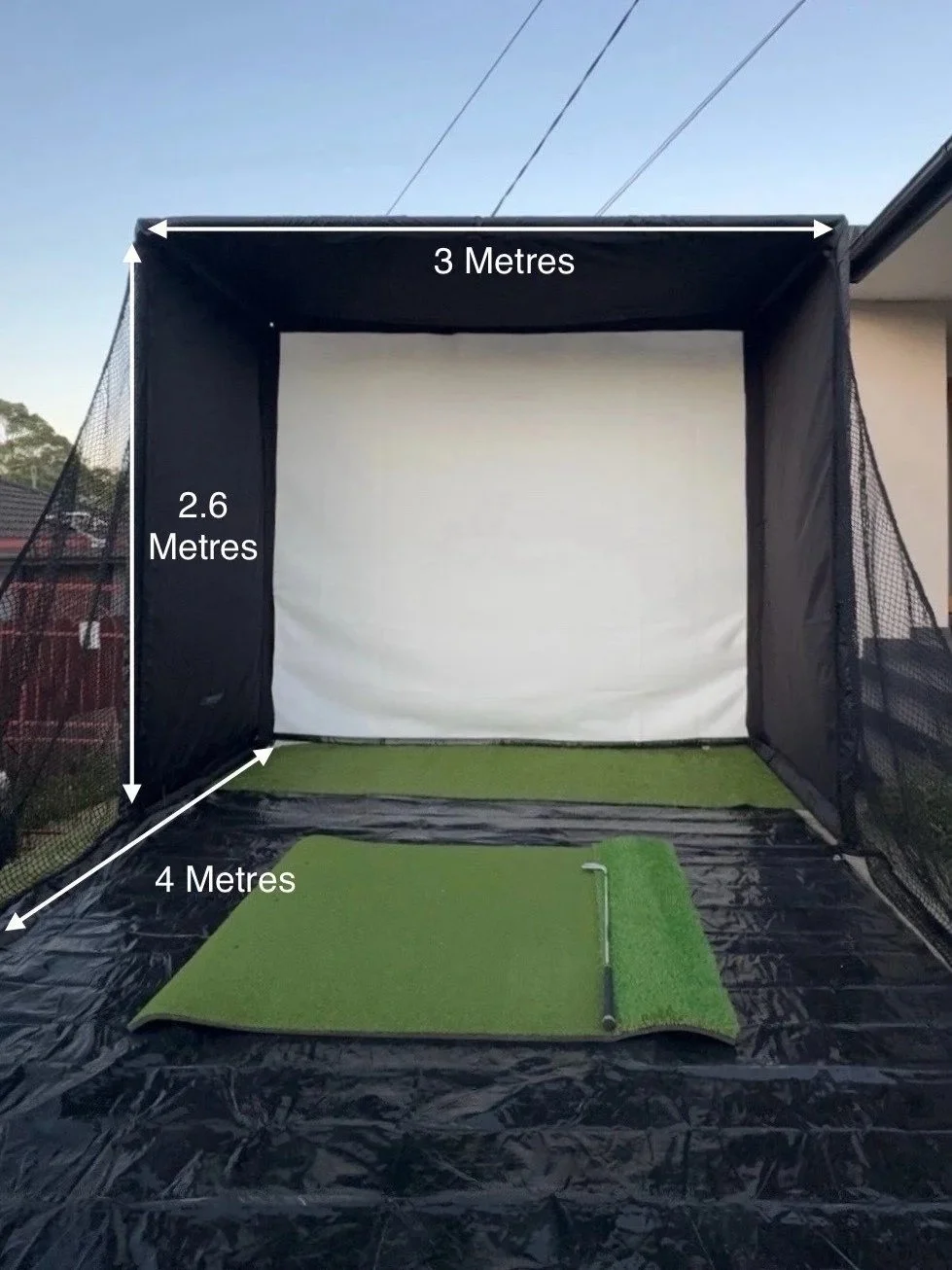
Space & Power Requirements (Clear Diagram + Checklist)
Minimum recommended space:
Height: 3 metres
Width: 3 metres
Depth: 4 metres from screen to hitting position
Flooring:
Carpet, timber, concrete or artificial turf are all suitable as long as the surface is relatively level.
Power:
One standard 240V power outlet within 10 metres of the setup location.
Lighting:
Moderate indoor light is ideal. If outdoors, the area should be under shelter (marquee, terrace, or covered area) for both safety and screen visibility.
If you’re unsure, send us photos and measurements with your enquiry and we’ll confirm whether it works or suggest alternatives.
Sydney Suburbs We Service
We provide mobile golf simulator hire across greater Sydney and can also travel to regional NSW and interstate by arrangement. Below are some of the key areas we service regularly. If you do not see your suburb listed, feel free to ask.
Mention your location when you enquire↗ and we will confirm availability within 1 business day.
-
Sydney CBD, The Rocks, Barangaroo, Darling Harbour, Haymarket, Pyrmont, Ultimo, Surry Hills, Darlinghurst & Potts Point
-
North Sydney, Kirribilli, Mosman, Neutral Bay, Cremorne, Cammeray, Crows Nest, St Leonards, Wollstonecraft, Lane Cove, Chatswood, Willoughby, Roseville, Lindfield, Killara, Gordon, Pymble, Turramurra, Wahroonga, St Ives, Hornsby
-
Manly, Fairlight, Balgowlah, Seaforth, Brookvale, Dee Why, Collaroy, Narrabeen, Warriewood, Mona Vale, Newport, Avalon Beach & Palm Beach
-
Bondi, Bronte, Tamarama, Clovelly, Coogee, Randwick, Maroubra, Kingsford, Rose Bay, Double Bay, Bellevue Hill, Vaucluse & Watsons Bay
-
Parramatta, Granville, Merrylands, Westmead, Toongabbie, Seven Hills, Blacktown, Penrith, Kingswood & St Marys
-
Newtown, Marrickville, Petersham, Dulwich Hill, Leichhardt, Lilyfield, Balmain, Rozelle, Drummoyne, Ashfield, Five Dock & Concord
-
Baulkham Hills, Castle Hill, Kellyville, Rouse Hill, The Ponds, Schofields, Quakers Hill, Glenwood, Bella Vista, Norwest, Stanhope Gardens & Dural
-
Bankstown, Revesby, Liverpool, Casula, Fairfield, Wetherill Park, Cabramatta, Bonnyrigg, Campbelltown, Narellan & Camden
-
Mascot, Rosebery, Alexandria, Zetland, Botany, Rockdale, Brighton-Le-Sands, Kogarah, Hurstville, Penshurst & Sans Souci
7. Event Types We Support -
Quick overview tied to high-intent searches. —> Carousel but chatgpt says only do 1-2 photos in total.
Corporate events & team-building
Milestone birthdays
Community events & markets
Workplace activations
School or club fundraisers
Backyard parties
Include 1–2 photos for each type if possible.
8. Gallery (High-Value SEO Section)
This will drive engagement and improve image search visibility.
Include:
• 6–12 photos
• alt text with “golf simulator hire Sydney”, “mobile golf simulator Sydney” etc.
11. Pricing & Packages (Teaser + CTA to Services Page)
Include a short summary, then direct them to the full pricing page.
Suggested:
• Warm Up – 2 hours
• Social Butterfly – 4 hours
• The Ultimate – Custom
Insert CTA buttons:
• View Packages
• Check Availability
12. Testimonials or Case Studies (Optional but High Yield)
If you have 2–4 short testimonials, include them here.
Even short quotes give strong trust signals.
13. FAQ Section (4–6 high-intent questions)
Examples:
• How much space do I need?
• Can it be set up outdoors?
• How long does setup take?
• How many guests can play at once?
• What suburbs do you service?
• What’s the best package for a birthday/corporate event?
This section is perfect for FAQ Schema.
14. Final CTA Section
Reinforce your primary conversions.
Headline:
Ready to Bring Mobile Golf to Your Event?
Buttons:
• Check Availability
• Get a Quote
• View Packages
Include a premium setup image.